The ENH Master rack on a quartz shelf by a window, the LUNCHBOX beside it

FREEVST3 for Windows & Linux · Gamer app for Windows

A studio rack for
everything you hear.

Eleven adaptive processors, 56 more units and a ten-slot 500-series lunchbox, drawn as real 3D hardware.

Footsteps and detail come forward, loud bangs stop ducking everything else, and nothing ever leaves it too loud for your ears.

73rack units, one plugin
0 dBFSnever over, true peak
182AudioLab test runs, every preset
0trackers, cookies or ads here
Take it apart

Inside the rack

The eleven at its heart, bottom to top, in signal order.

Each one does one job, and they're built to work together: nobody undoes what the unit before it did. Scroll to pull one out and take it apart; pick any unit, drag to turn it, and point at a part to see what it does.

Pick a unit

02 · Adaptive EQ - harmonic exciter - sub

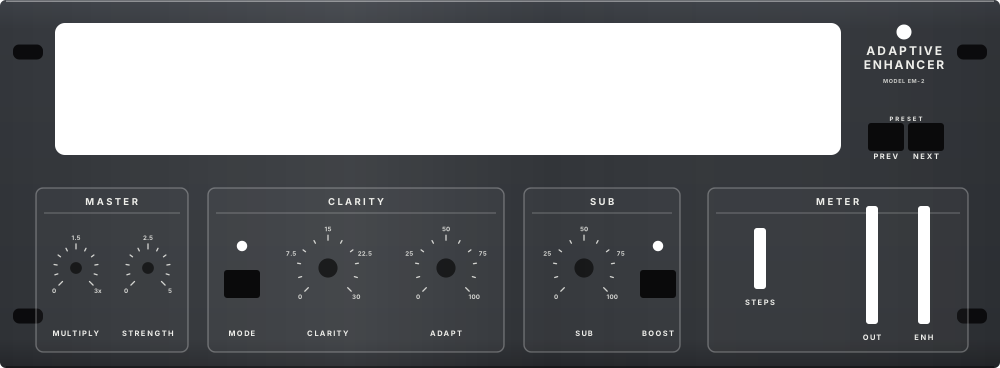
ADAPTIVE ENHANCER

CLARITY, precision bands, sub. Front to back: the controls, the faceplate, the displays and meters, the DSP board and the chassis.

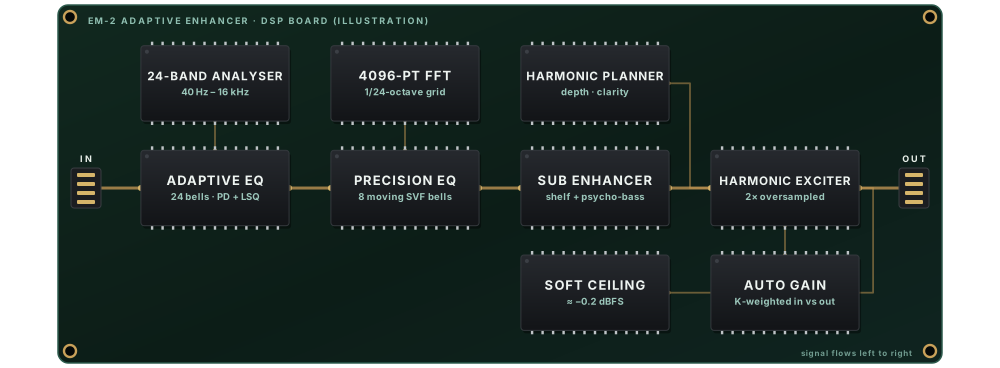
The board is an illustration of the unit's real DSP stages, not a physical circuit: ENH Master is software. The panels are drawn from the plugin's own layout.

The ADAPTIVE ENHANCER, part by part

Displays & metersAnalyser display
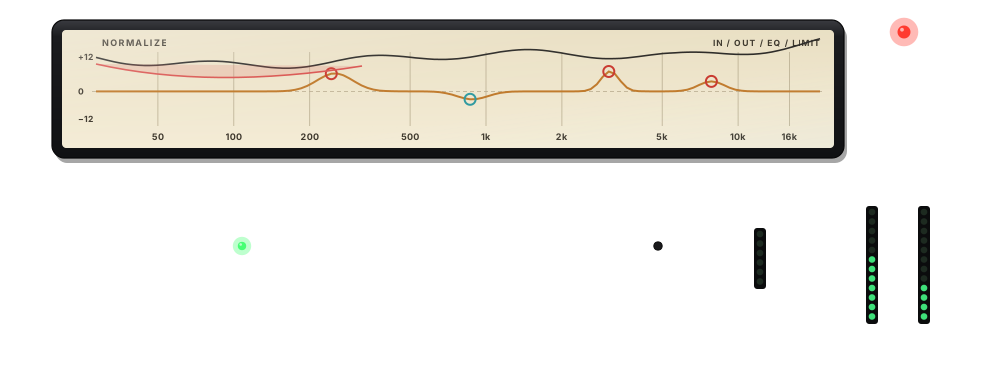
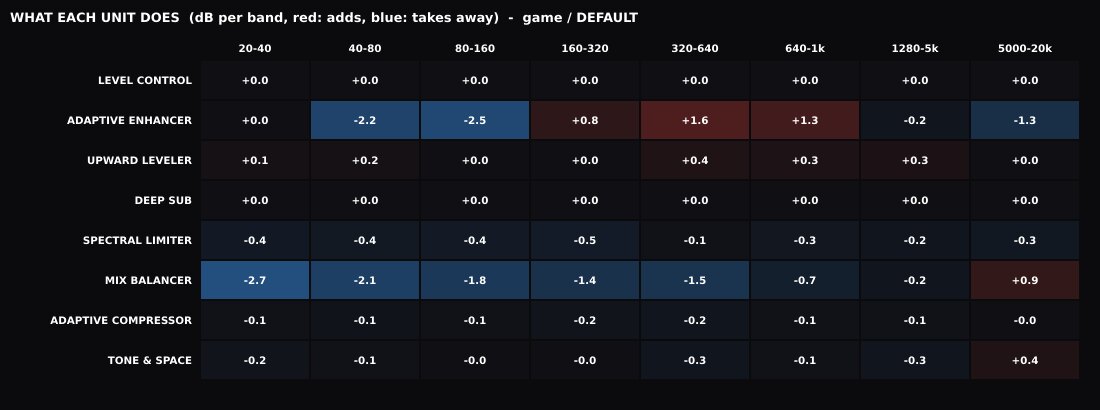
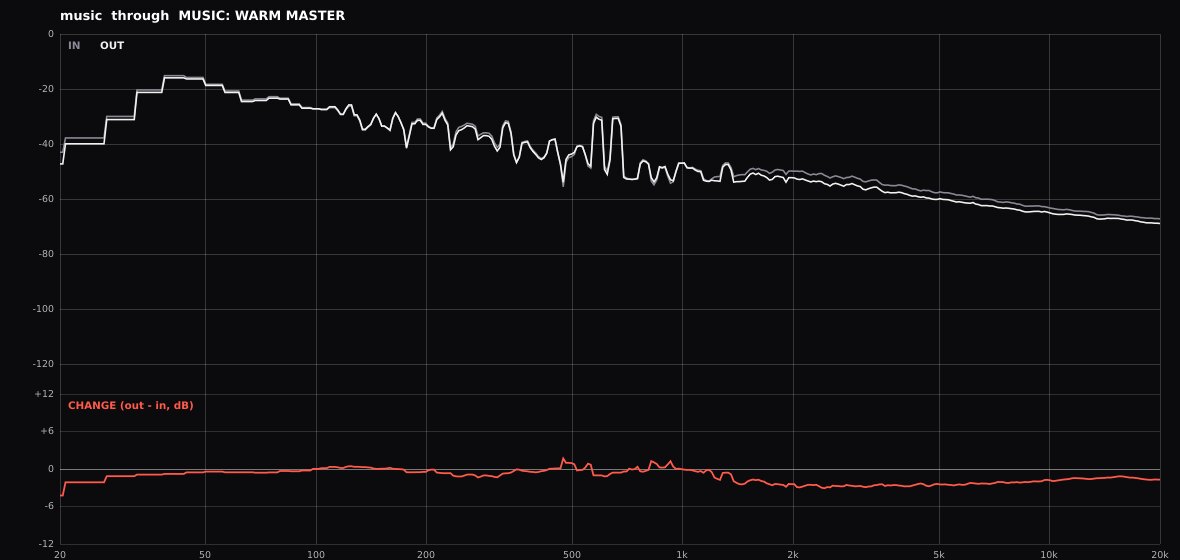
The analyser window: the programme's spectrum, the live EQ curve CLARITY is applying, the precision bands as circles on it, and the limiter's cuts.
ControlsPREV button
Steps to the previous preset.
ControlsNEXT button
Steps to the next preset.
ControlsMULTIPLY
Scales every knob on the unit at once, 0 to 3×.
ControlsSTRENGTH
How hard the whole unit hits: 0 is no effect, 1 as set, up to five times.
ControlsMODE button
Swaps CLARITY between NORM (0–30: rebalance, resonances and holes) and ADD + NORM (0–10: also adds definition and detail where it's missing).
ControlsCLARITY
How much the adaptive EQ corrects: it rebalances treble and bass against the mids, cuts resonances and fills holes, all from the sound itself. Scales the precision bands' cut and lift limits too.
ControlsADAPT
How quickly the EQ follows the material: the integration time of the long-term spectrum it listens to.
ControlsSUB
Sub enhance: a dynamic low shelf that lifts weak lows more than strong ones, plus psychoacoustic harmonics so the bass is heard on headsets.
ControlsBOOST button
A higher lift ceiling, a tuned 55 Hz punch peak and more harmonics.
Displays & metersLED meters
OUT is the output level; ENH how much the enhancer is doing; STEPS lights when the FOOTSTEP RADAR finds a step.
DSP board24-Band Analyser
24 overlapping log-spaced bands on the mono input, with fast, short and medium followers and rolling statistics (noise floor, mean, deviation) for self-tuning.
DSP board4096-Pt Fft
The precision layer's ears: a 4096-point FFT (hop 2048) folded onto a 1/24-octave grid; what sticks up is a resonance, what sinks is a hole, and each one's width becomes a bell's Q.
DSP boardHarmonic Planner
Decides where harmonics are missing: a DEPTH source (70–500 Hz) and a CLARITY source (600–5000 Hz), whose centres glide with the music.
DSP boardAdaptive Eq
No target curve: each band follows its own target through a PD controller, and the 24 overlapping bells are solved by least squares so they don't pile up.
DSP boardPrecision Eq
Up to eight bells with their own frequency, Q and depth that follow resonances and holes as they drift. Cuts up to 8 dB, lifts up to 3; zero latency.
DSP boardSub Enhancer
A dynamic low shelf under a PD controller, and the sub band saturated and band-passed around its own 2nd and 3rd harmonics.
DSP boardHarmonic Exciter
Two exciters (DEPTH and CLARITY): the planned band isolated, normalised, and fed through Chebyshev polynomials T2 and T3, so only new 2nd and 3rd harmonics are added.
DSP boardAuto Gain
Loudness-matched auto gain, so the enhancement is heard as detail rather than as level.
DSP boardSoft Ceiling
Transformer/valve colour, DC blocking and a soft ceiling at about −0.2 dBFS, still inside the 2× oversampled section.
FaceplateFaceplate
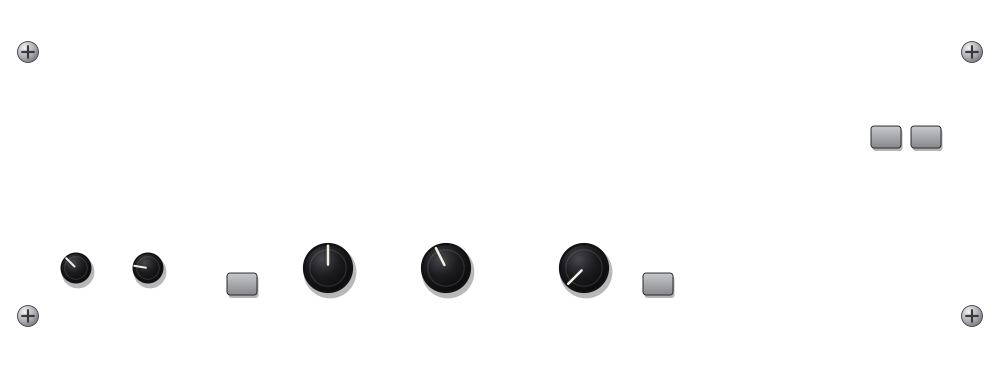
The dark Pro-XL-style front: outlined sections with titles, printed scales, square push buttons with an LED above.

Where to

Pick a place.

3.8 New in this version

  • 53 new rack unitsReverbs, tape, vari-mu, the 882i, and 35 live simulations - a record deck, a Tesla coil, 20 for mastering - each on its own screen.
  • A 10-slot LUNCHBOXIts own gear locker and 14 new 500-series modules, as clean as its EQ.
  • A room with a viewThe rack on a quartz shelf by a window, and a hologram welcome screen.
  • ENH Master 2DThe same plugin, drawn flat, for older graphics.

What it does for you

Hear more of the game. Hear your mix as it is.

One rack, two jobs. In a game it brings the detail forward and keeps the bangs in their place; in a DAW it is a set of adaptive mastering tools you can A/B at the same loudness.

Gamers

  • Every step, near and far. The FOOTSTEP RADAR lifts steps in their own bands; far ones get a little room, near ones stay dry.
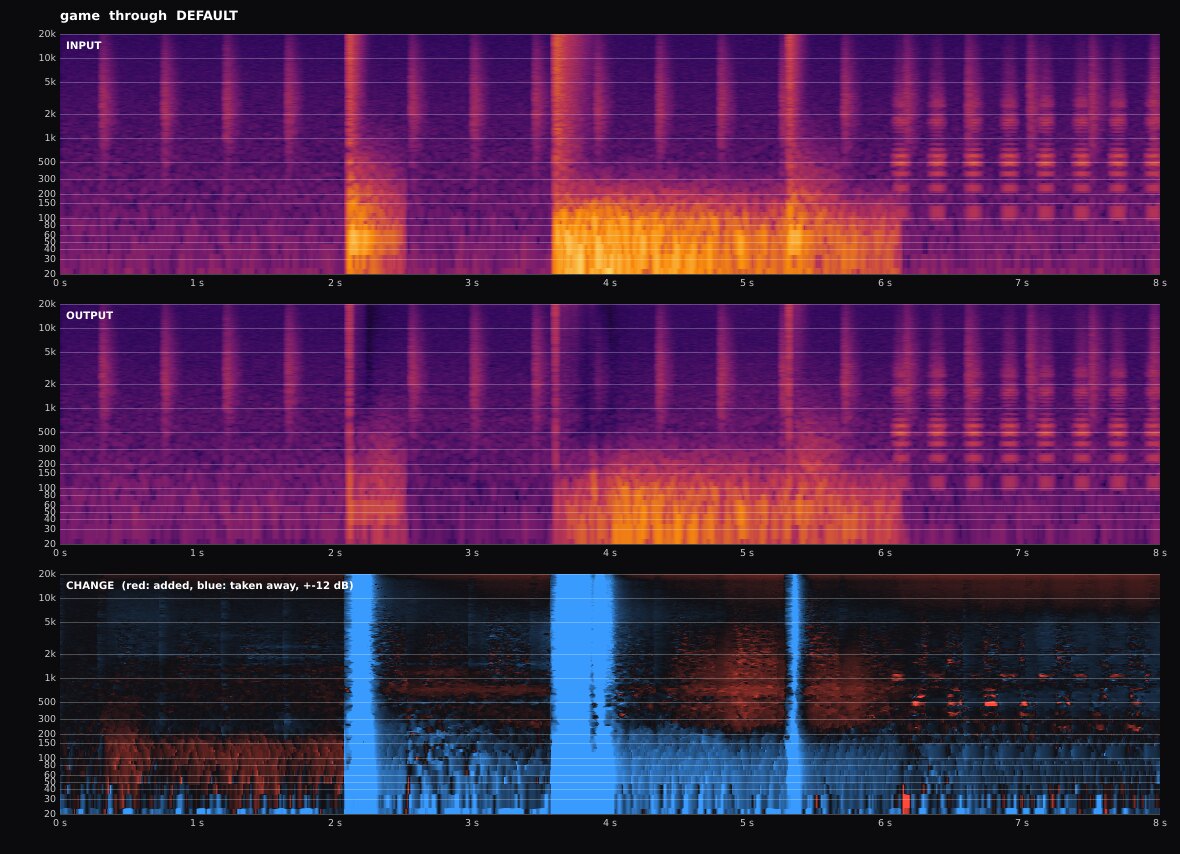
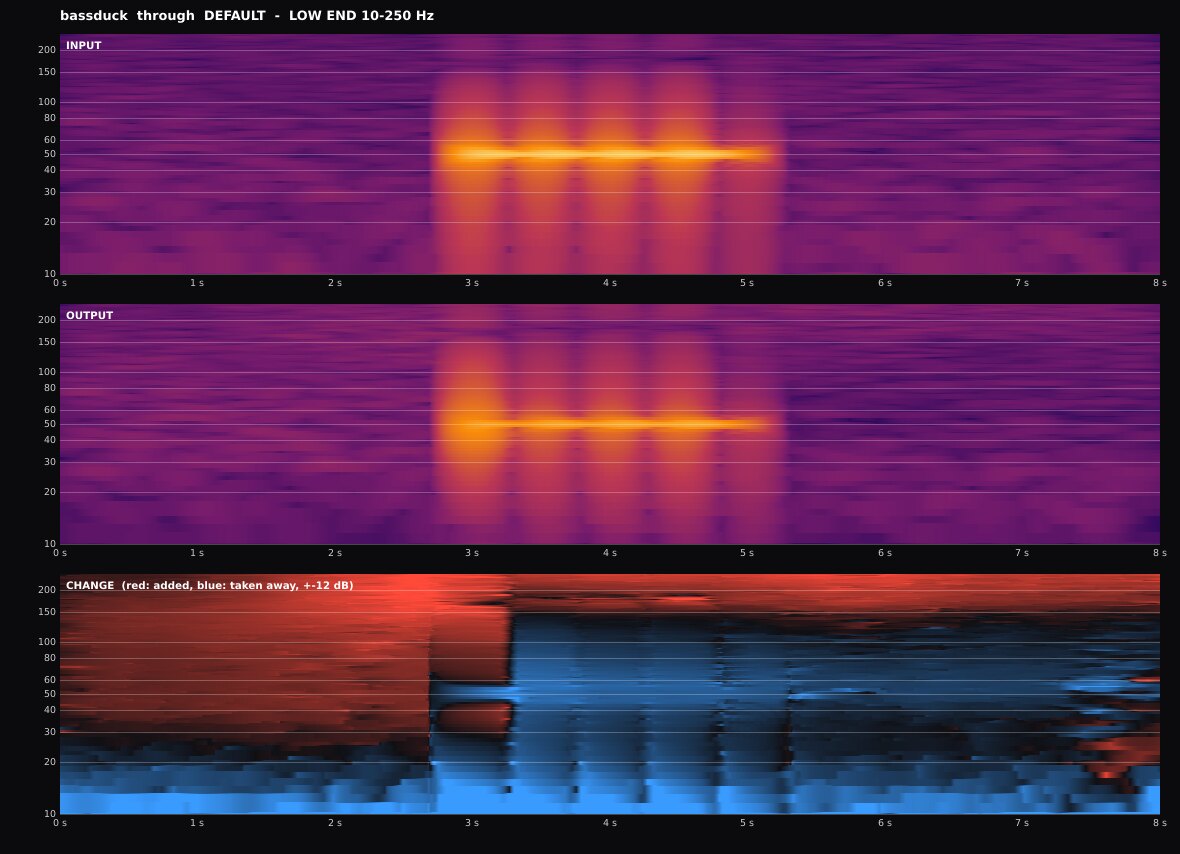
  • Bangs stop ducking everything. A bass hit is taken down where it is, so the footsteps and voices above it keep their level.
  • Never too loud. EAR GUARD holds a sudden blast to 12 dB over what you've been hearing, and nothing leaves over 0 dBFS.
  • Between your games and your headset. The Windows app inserts the rack and takes it out again.
See the radar at work

Producers

  • VST3 for any DAW on Windows or Linux.
  • Level-matched A/B. COMPARE plays the input at the output's loudness, so you judge the sound, not the level.
  • An EQ that listens. CLARITY builds its curve from the sound itself, and shows you every band it moves.
  • Consoles, tape and valves. CHARACTER blends two of nine models; TONE & SPACE adds polish, air, width and room.
Try CLARITY
A glass panel open beside the rack, listing the ADAPTIVE ENHANCER's settings and what each one does
Every unit's settings are explained in its glass panel.

Click any unit and its glass panel lists every setting, with what it does to the sound.

Demo 1 / 4Clarity

An EQ that listens, and shows you what it's doing.

There's no fixed "smile" curve. CLARITY builds its curve from the sound itself, and you can watch it live over the spectrum.

  • 24 adaptive bands rebalance treble and bass against the midrange, but only when the sound really needs it.
  • Up to 8 precision bands, each with its own frequency, width (Q) and depth: a narrow dip where something rings, a wide one for a build-up, a gentle lift into a hole. You can watch every one move.
  • Harmonics add definition and body where they're missing, never at a fixed spot.
The ADAPTIVE ENHANCER's display: the live EQ curve over the spectrum, with its precision bands marked

Try it: hide a ring, and watch CLARITY find it

We hid a +10 dB resonance at 2.3 kHz (Q 8) in pink noise. One precision band found it on its own, and cut exactly there, exactly that narrow: in the real test 2305 Hz, Q 8.9, cut 5.3 dB. Move the ring, make it a hole, or turn CLARITY, and see where the band goes.

footsteps & voices: 250 Hz to 5 kHz−10−50 dB+5+10+152003005001k2k3k5k10k Hz+10.0 dB ring at 2.3 kHzband: 2297 Hz, Q 9.4, cut 5.5 dBwidth (Q)
2.3 kHzRing frequency
Q 8.0Ring width (Q)
+10.0 dBRing height
15CLARITY

CLARITY 15 placed one band at 2297 Hz, Q 9.4, cutting 5.5 dB.

  • the ring hidden in the noise
  • the precision band CLARITY placed
  • what you hear

The plugin's own maths. The band is placed by a line-by-line port of PrecisionEQ.cpp: the 1/24-octave grid, the baseline it is measured against, the width where it falls to half its height, the 8 dB cut and 3 dB lift limits scaled by CLARITY, and the narrower-cut rule between 250 Hz and 5 kHz. It is drawn with the exact response of its state-variable bell. Simplified: the noise is its long-term average (no randomness), and you see where the band settles, not its glide there.

Demo 2 / 4Footstep Radar

Hear every step, and hear how far away it is.

A detector built from scratch that recognises footsteps by how they start, die away and ring. It tells them apart from gunshots, voices, music, rain and reloads, and it knows a drum machine's steady grid when it hears one.

Far steps get more lift and a room behind them; near ones stay dry and close.

The FOOTSTEP RADAR unit in olive drab, with its STEP LIFT meter
100 %

Near steps foundon all 10 surfaces

98 %

Very far stepsat −60 dBFS, a quiet scene

4 PER MIN

False lifts on musicdown from 158 with the old detector

Try it: what a step gets

Once a step is confirmed, how much it is lifted and how much room it is given depend on how far away it sounds. Turn BOOST and SPACE as on the unit, and set how loud the step is.

0 dB+3+6+9+12near0.250.50.75far0%30%60%90%
  • lift in the step's strongest band
  • room send (right scale)
6.0 dBBOOST
4.0SPACE
−40 dBFSStep's peak

A near step gets +2.1 dB, dry; a far one +6.0 dB with 36 % sent to the room.

The plugin's own maths: the lift and room-send formulas FootstepRadar.cpp applies to an accepted step. Simplified: a confident step (detection probability 0.86 or more), the lift shown in its strongest band (its other bands get a share by how far each rose), and distance as the detector's own 0-to-1 estimate.

The test bench: 10 surfaces × 5 distances

Real numbers from the detector's own test bench.

Percent of steps found, per surface and distance. "Buried" steps are exactly as loud as the ambience around them; the test only asks for 15% there.
SurfaceNearMidFarVery farBuried
Concrete1001001001000
Metal10010010010012
Wood1001001009456
Grass10010010010019
Gravel10010082880
Snow1001001001000
Sand10010010010012
Water10010081940
Carpet10010010010082
Tile100100941006
All100100969819

The hard scenes

Steps hidden in the mess of a real match. The thin line on each bar is what the test demands; every one passes.

  • Running (0.3 s apart)100%
  • Sneaking (quiet)100%
  • From behind (out of phase)95%
  • In the wind91%
  • Two walkers at once92%
  • Around explosions76%
  • Between gunfire61%
  • In the rain52%
  • Under a voice48%
  • Under music (steps 16 dB below it)42%

Alone, with no steps at all: speech, gunfire, explosions, rain and UI clicks give 0 false lifts a minute; reloads 2; music 4.

15 of 15 footstep checks pass

Tuned on a real match

A 30-second recording from a real game: running footsteps close by, gunfire, and the rest of a busy match.

  • 3 → 7of 11 close running steps found
  • 0lifts on the burst of gunfire, before and after
  • 13–19 dBhow far those steps stand above the match, against 23 dB and more for a shot
gunfireclose running steps (marked)Your stepsBeforeAfter3 of 11 steps7 of 11 steps16 s17 s18 s19 s20 s21 s22 s23 s24 s

a step you can hear   lifted, on a step   lifted, something else (steps outside the marked stretch, and other hits)

What it showed: close footsteps in a loud mix are as loud and as broad as a gunshot, and the radar took them for shots. The difference is the shape: a shot is top-heavy, 10 to 15 dB stronger in the high bands; a footstep lands with weight, 3 to 9 dB stronger low down. The radar now tells them apart by that, keeps a walker's beat on the first hit of each step (a game's heel and toe), and stops treating a step that lands on the walker's beat as a rattle. Every check on the test bench still passes.

Earlier results (no longer current)

The numbers from before the real-match tuning (3.7.12.12), kept for the record. The bench above is current.

  • Two walkers at once85% found (now 92%)
  • Around explosions72% found (now 76%)
  • Classic crates30.0 false lifts a minute (now 31.5, the test allows 36)
  • The real match recording3 of 11 close running steps found (now 7)

Demo 3 / 4Safe for your ears

Always on, whatever you turn.

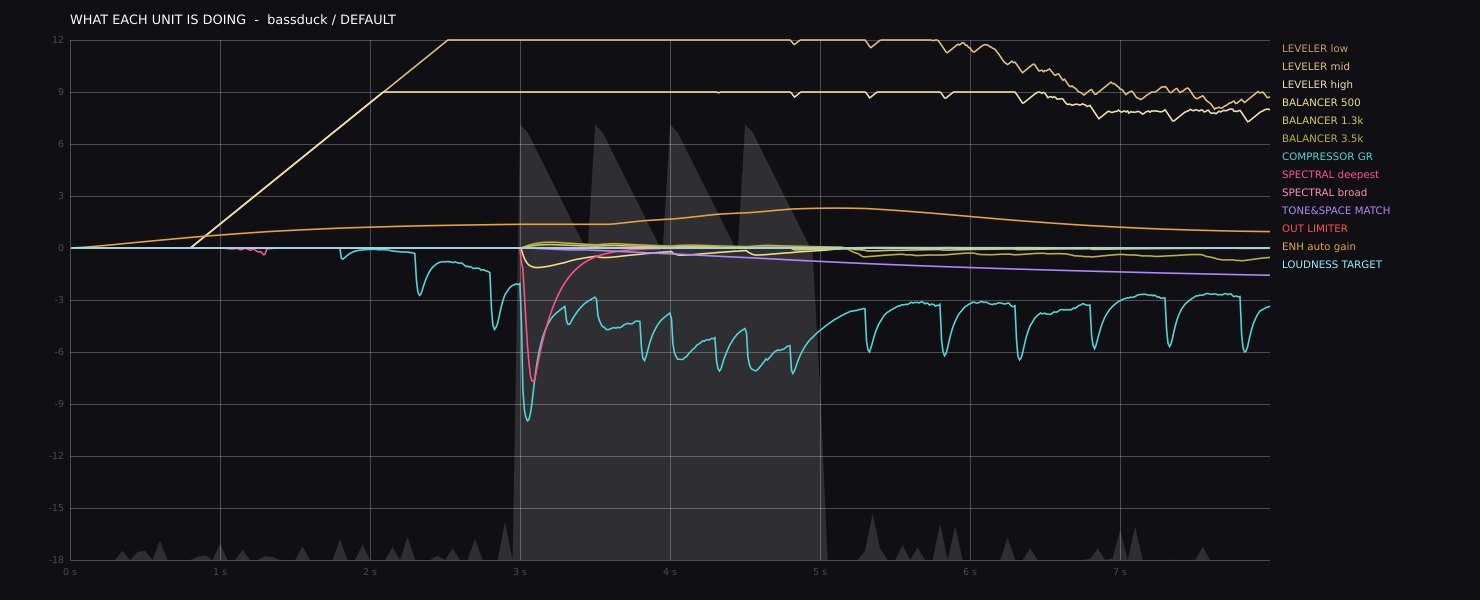
EAR GUARD never lets the sound get more than 12 dB (about four times) louder than it has been. It measures loudness the way ears do (K-weighted, over 400 ms) and looks 5 ms ahead, so a blast after a quiet stretch is held down before you hear it.

0+10+20+30+40+35.0 dBblast in+13.7 dBwhat you hear
  • the blast going in
  • what reaches your ears
  • guard settings
  • A +35 dB blast comes out at +13.7 dB. Loud-and-steady material, like a mix that is simply loud, is left untouched.
  • Want more punch? Set it to 15 or 18 dB. It can't be switched off.
  • Never over 0 dBFS, including the peaks between samples (true peak).
  • No pops when audio starts, and silence instead of a blast if anything ever goes wrong inside.
  • No DC or rumble below 8 Hz reaches your speakers.

Every one of these is checked by the automated tests on every build. Your headset's volume is still yours to set: start low.

Try it: throw a blast at it

A quiet scene teaches it what "usual" is, then the blast comes. Set how much louder and how long, and pick the setting (12, 15 or 18 dB). The dial above follows.

0+10+20+30+40−0.500.511.522.5 s
  • the blast going in
  • what reaches your ears
  • its last 400 ms
  • the budget: usual + setting
+35.0 dBBlast
2 sLength
EAR GUARD setting
Try

Loudest 400 ms after it starts: +35.0 dB going in, +13.7 dB reaching your ears (held down by up to 23.9 dB).

The plugin's own maths: a line-by-line port of EarGuard.h, run at 48 kHz: the 400 ms energy budget, the "usual" loudness (learned for 2 s, then followed over 10 s up and 30 s down, rising at most 0.75 dB a second while it holds), the 5 ms look-ahead, the even spending (a burst at most 8 dB over the allowed level after a quiet stretch, none once the window is full), 0.8 ms attack, 60 ms release and 30 dB floor. Measured as the tests do: the loudest 400 ms in the first 2 s, against the 2 s before. Simplified: the sound is steady noise, so the guard sees only its K-weighted power, and the output limiter after it is left out. The test through the whole rack measures the same +13.7 dB.

Demo 4 / 4Character & Tone

Consoles, tape and valves, and a finish that shines.

CHARACTER blends two of nine hardware models (British and American consoles, class-A, tape at 15 and 30 ips, a breathing valve, and two tuned for games and film), with COLOUR at any volume and DRIVE for grit. TONE & SPACE adds polish, air, width and room.

Try it: a 1 kHz tone through CHARACTER

Pick a model and turn COLOUR and DRIVE. The bars are the harmonics it adds to a pure tone, against the tone itself: even ones sound warm and full, odd ones give edge. COLOUR brings the character in at any level; DRIVE pushes into grit.

THD 0.71 %

−120−100−80−60−40−200 dB2nd3rd4th5th6th7th8th9th10th
  • even harmonics: warmth, weight
  • odd harmonics: edge, bite
VINTAGEModel
5.0COLOUR
5.0DRIVE
−18 dBFSSine level

VINTAGE CONSOLE, 1 kHz at −18.0 dBFS: THD 0.71 %. 2nd harmonic −43 dB, 3rd −59 dB against the tone.

The plugin's own maths: each model's chain from Character.h (transformer flux stages, biased valve and op-amp stages, tape emphasis and its curve, slew, the voicing EQ scaled by COLOUR, COLOUR's lift toward each model's sweet spot, GRIT's guard), run at the plugin's 4x rate and measured like its unit tests. Its THD figures match the plugin's own test table. Simplified: one model at a time (no BLEND), and the oversampling filters and loudness match are left out, as they don't change the harmonics.

CHARACTER: A and B model selectors, BLEND, COLOUR and DRIVE, with its harmonics meter
CHARACTER: two models at once, blended.
TONE & SPACE: polish, air, width and room controls
TONE & SPACE: polish, air, width and room.

The test lab

Measured, not just listened to.

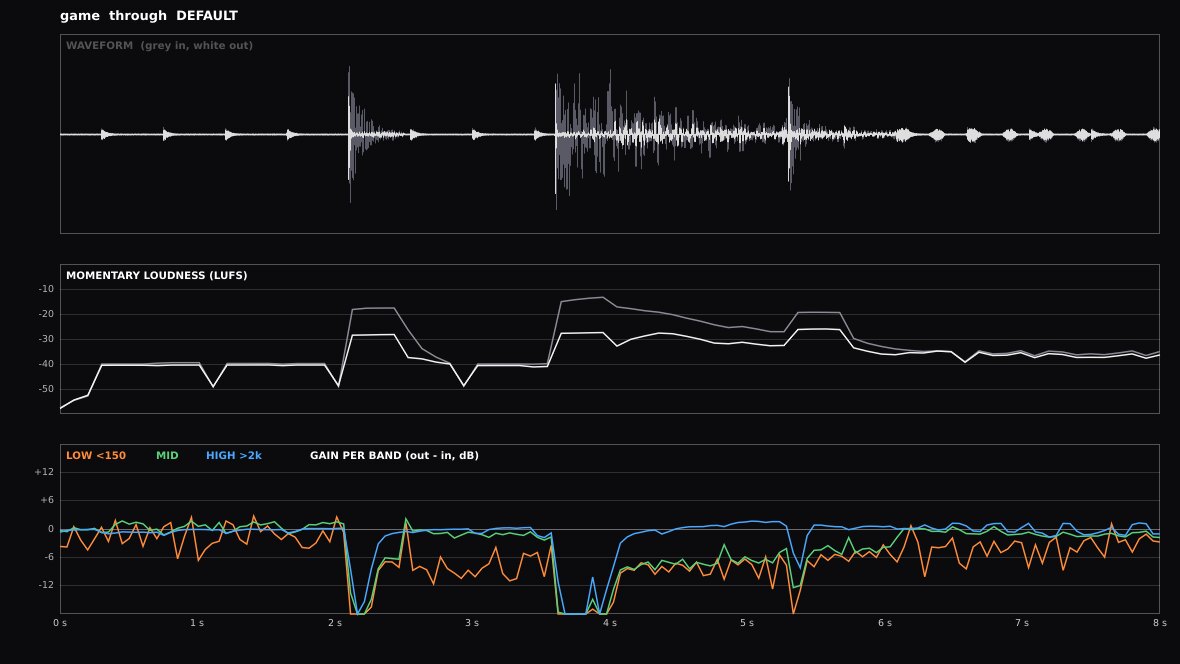
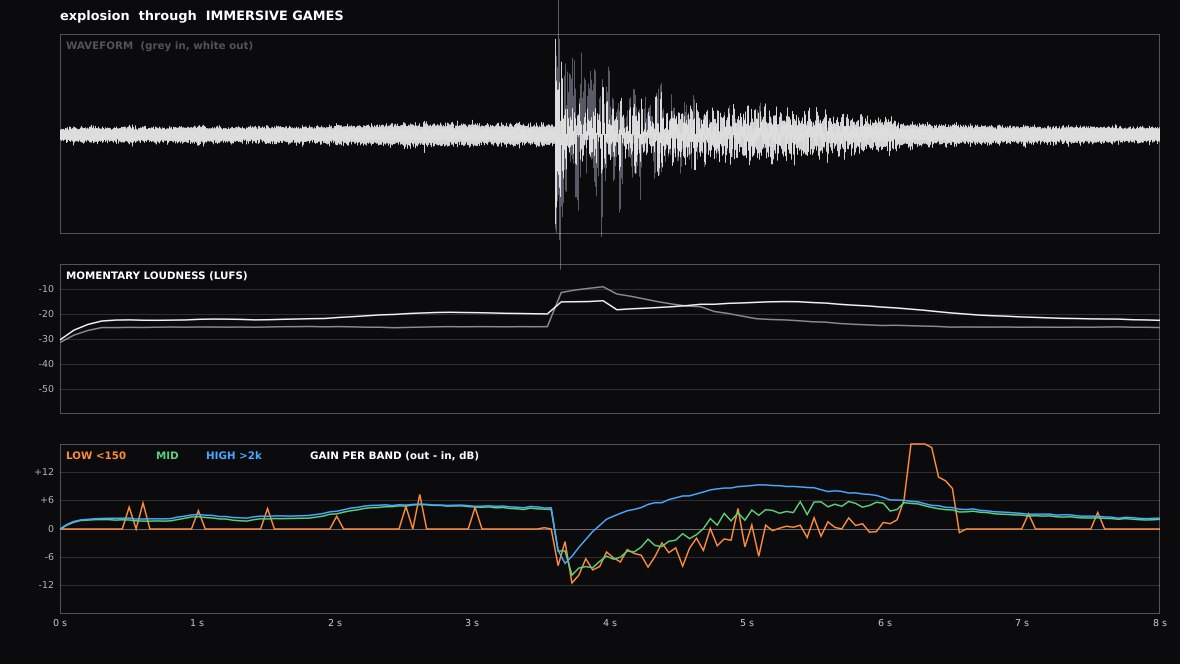
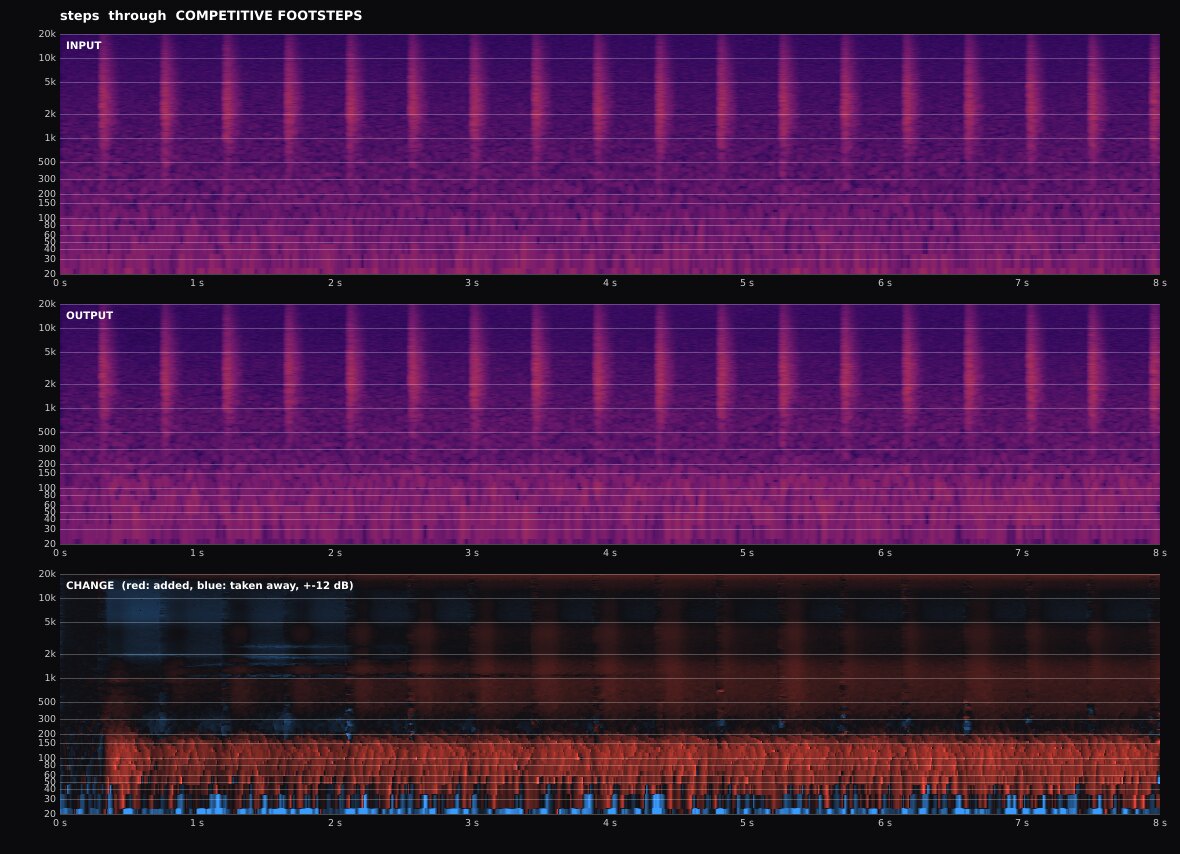
Everything is checked by automated tests: a DSP suite of hundreds of checks, every preset through 18 scenes in our AudioLab tool, and the gamer router on a real sound server. These are the graphs it draws. Click any one to see it full size.

100sDSP checks: phase, clicks, aliasing, loudness, peaks
182AudioLab runs: every preset through 18 scenes
15 / 15footstep detector checks passing
13.5 msper frame, down from 14.9 after the look update

Get it

Four ways to use it.

Gamers (Windows)

The standalone app puts the rack between your games and your headset, and takes it out again. Install the free VB-Audio Cable, pick your headset, press INSERT RACK.

windows-gamer-app.zip →

Producers

The VST3 plugin for any DAW on Windows or Linux: mastering tools, level-matched A/B, and every unit's settings in its glass panel.

windows-x64.zip / linux-x64.zip →

Build it yourself

Open source (Apache 2.0). One script checks your tools, fetches what it needs and builds.

./build.sh

Older graphics

ENH Master 2D: the same plugin and sound with a flat rack - every faceplate, one under another. No OpenGL. Installs alongside.

ENH-Master-2D zips →

Which one do I need?

  1. You play games on Windows and want to hear more: the gamer app (windows-gamer-app.zip).
  2. You make music in a DAW, or run Carla on Linux: the VST3 (windows-x64.zip or linux-x64.zip).
  3. Your computer's graphics are old or slow (it stutters, or won't open): the 2D version of either (ENH-Master-2D-…). It sounds exactly the same.
3D against 2D
3D (ENH Master)2D (ENH Master 2D)
SoundExactly the same: the same units, presets and settings
LooksThe rack in 3D, in a room, with live screens and a magnifierEvery faceplate flat, one under another; scroll to move
GraphicsOpenGL 3.2 - Intel UHD 600 or better runs it smoothlyNo OpenGL needed: any graphics
MemoryAbout 300 MBLess

Install the plugin

Unzip, then copy ENH Master.vst3 to your VST3 folder: C:\Program Files\Common Files\VST3 on Windows, ~/.vst3 on Linux. Rescan plugins in your DAW or Carla.

Install the gamer app

Install the free VB-Audio Cable, run ENH Master.exe, pick your headset under LISTEN ON and press INSERT RACK. Press it again to take the rack out.

What it runs on

Windows 10 or 11 (64-bit); Linux x64 (Ubuntu 22.04 or newer, or the same age). A 64-bit DAW for the VST3. Every download has a checksum: check it.

New in 3.8

53 new units - 35 of them live simulations, 20 for mastering - a 10-slot LUNCHBOX, a gear locker by category with previews, a room around the rack, and knobs that never click. Everything that changed.

Check your download

Make sure it's the real one.

  1. Every release has a SHA256SUMS.txt with a fingerprint of each download and of every script (build.sh, convert-to-windows.bat, the scripts/ folder), and a HOW-TO-CHECK.txt.
  2. Each zip also has a CHECKSUMS.txt for the files inside it, the scripts' fingerprints and the same HOW-TO-CHECK.txt. A zip can't hold its own fingerprint, so check the zip itself against the release page.
  3. Work out the fingerprint of your copy and compare it with the list. If even one character differs, don't run it.

Windows (PowerShell)

Get-FileHash .\ENH-Master-*-windows-gamer-app.zip -Algorithm SHA256

Windows (Command Prompt)

certutil -hashfile ENH-Master-...-windows-gamer-app.zip SHA256

Linux / macOS

sha256sum -c SHA256SUMS.txt --ignore-missing

This page keeps to itself

No trackers, no cookies, no ads, no fonts or scripts from anywhere else. It loads nothing from anywhere but this site, and tells no one where you go next.